


A WordPress code snippet sandbox is a throwaway WordPress you can run code against, then close. WPPaste is one that runs in a browser tab: paste a PHP snippet, press Run, and a real WordPress boots on WebAssembly and executes it. Nothing is installed or uploaded, and saving gives you a shareable URL others can run and edit.
One extra touch worth knowing about: every core function, hook, class and method in the snippet becomes a link to its reference page, so reading somebody else's code does not mean keeping the developer handbook open in another tab.
I have spent close to two decades in #wordpress on IRC, first on Freenode and now on Libera.Chat, and the failure mode there never changes. Somebody has a broken save_post callback. They paste twelve lines into the channel, IRC strips the indentation, the room scrolls, and three people now have three different mental models of code nobody can see properly. The alternative is a generic pastebin, which fixes the formatting and nothing else: you still have to read the snippet, guess which WordPress version it targets, and rebuild the scenario locally before you can say anything useful.
A sandbox is not a staging site
These three get used interchangeably and they solve different problems:
| Where it runs | Lives for | Good for | |
|---|---|---|---|
| Sandbox | A browser tab, on WebAssembly | Until you close it | Checking what a function returns, reproducing a bug, handing someone a runnable example |
| Staging site | A server, usually a copy of production | As long as you pay for it | Rehearsing a real deploy against your real content and plugins |
| Local install | Your own machine, via Docker, DDEV or similar | Until you delete it | Day-to-day development on a project you work on repeatedly |
A WordPress staging site is the right tool when the question is "will this break my site". A sandbox is the right tool when the question is "what does this code actually do", which is most of the questions people ask in a support channel. Setting up a WordPress test site to answer a five-line question is the overhead that stops people answering at all.
The trade-off is real, though. A sandbox starts from fixtures, not from your content, so it cannot tell you whether a snippet survives contact with your 40 plugins. For that you still want staging.
Paste it, and the symbols become links
Here is a snippet of the kind that shows up in the channel constantly. A save_post callback that writes back to the same post, with the unhook-rehook dance around it:
add_action( 'save_post', 'te_sync_price_label', 10, 3 );

function te_sync_price_label( $post_id, $post, $update ) {
	if ( wp_is_post_revision( $post_id ) || 'post' !== $post->post_type ) {
		return;
	}

	$price = get_post_meta( $post_id, 'price', true );
	if ( '' === $price ) {
		return;
	}

	remove_action( 'save_post', 'te_sync_price_label', 10 );

	wp_update_post( array(
		'ID'           => $post_id,
		'post_excerpt' => 'From ' . $price,
	) );

	add_action( 'save_post', 'te_sync_price_label', 10, 3 );
}
Saved as a paste, that becomes wppaste.com/p/ajziyumw. The code keeps its indentation, and the sidebar lists what the parser found in it: seven core functions and one hook, each with a count of how many times it appears and numbered jump links to each occurrence.
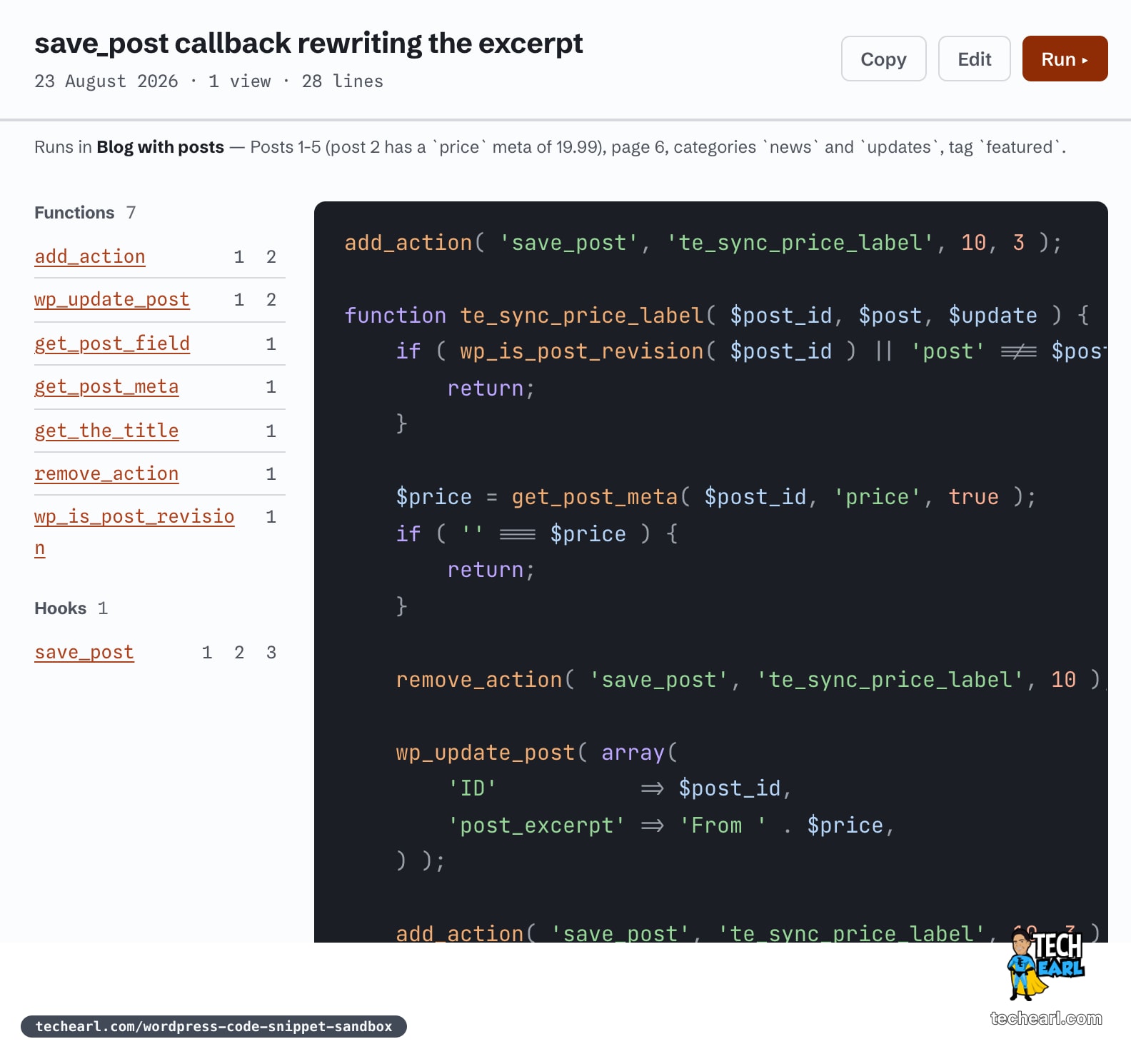
Two details in that screenshot matter more than they look. The line under the title reads Runs in Blog with posts, which tells you the snippet will execute against a site that already has posts 1-5, a page, two categories and a tag, with a price meta of 19.99 on post 2. So the example has something real to act on. And the editor footer, while you are still typing, reads registers hooks, so it loads as a mu-plugin: the site noticed the snippet calls add_action(), so instead of running it top to bottom it writes it into wp-content/mu-plugins/ and lets WordPress load it the way a must-use plugin actually loads. That is the difference between a snippet that appears to do nothing and one that behaves like it would on your site.
Run it, do not describe it
Pressing Run boots WordPress on WebAssembly through WordPress Playground in the right-hand pane. Nothing is installed, nothing is uploaded, and the whole thing happens in the browser tab. The person you sent the link to can press Run, change a line, and hand you back a paste of the version that works.
If you have ever used an online PHP editor or a PHP sandbox to settle an argument about what a function returns, this is that idea with WordPress already booted around it. The PHP runs for real, so var_dump() prints what it prints and a fatal error is a fatal error, but get_post() and wp_insert_post() are available because there is an actual WordPress underneath rather than a bare interpreter.
The sandbox is not an empty install. There is a set of pre-built environments a paste can boot into, which is what makes an example reproducible rather than merely plausible:
| Environment | What is already there |
|---|---|
| Blog with posts | Posts 1-5, a page, categories news and updates, tag featured, a price meta on post 2 |
| WooCommerce store | Five products by SKU, sale prices, an out-of-stock item, a customer and a completed order |
| Custom fields (ACF) | ACF active plus registered post meta, so get_field() and get_post_meta() can be compared side by side |
| SEO plugin installed | Yoast SEO over the standard blog fixtures |
| Contact form | Contact Form 7, with wp_mail intercepted and printed instead of sent |
| Large content set | 60 posts over 60 days, three authors, two categories |
| Debugging toolkit | Query Monitor and Health Check |
If none of those fit, the Blueprint tab exposes the underlying Playground blueprint as editable JSON, so you can pin a PHP version, install a specific plugin, or add your own setup steps before the snippet runs. That is the part I find genuinely useful for bug reports: "reproduce this on PHP 8.1 with only these two plugins" stops being a paragraph of instructions and becomes a link.
Pastes live under /p/ and that path is disallowed in the site's robots.txt, so your debugging snippet is not going into a search index. It is a link you hand to a person, not a page competing for traffic.
The reference the links point at
Every symbol link in a paste lands in the WPPaste WordPress code reference, which is the other half of the site and the half that took the real work. It is not scraped from anywhere. Each release is parsed from its own wordpress-develop tag with the same WP-Parser lineage that produces the official reference, and the counts on the page are what the parser actually found in that source.
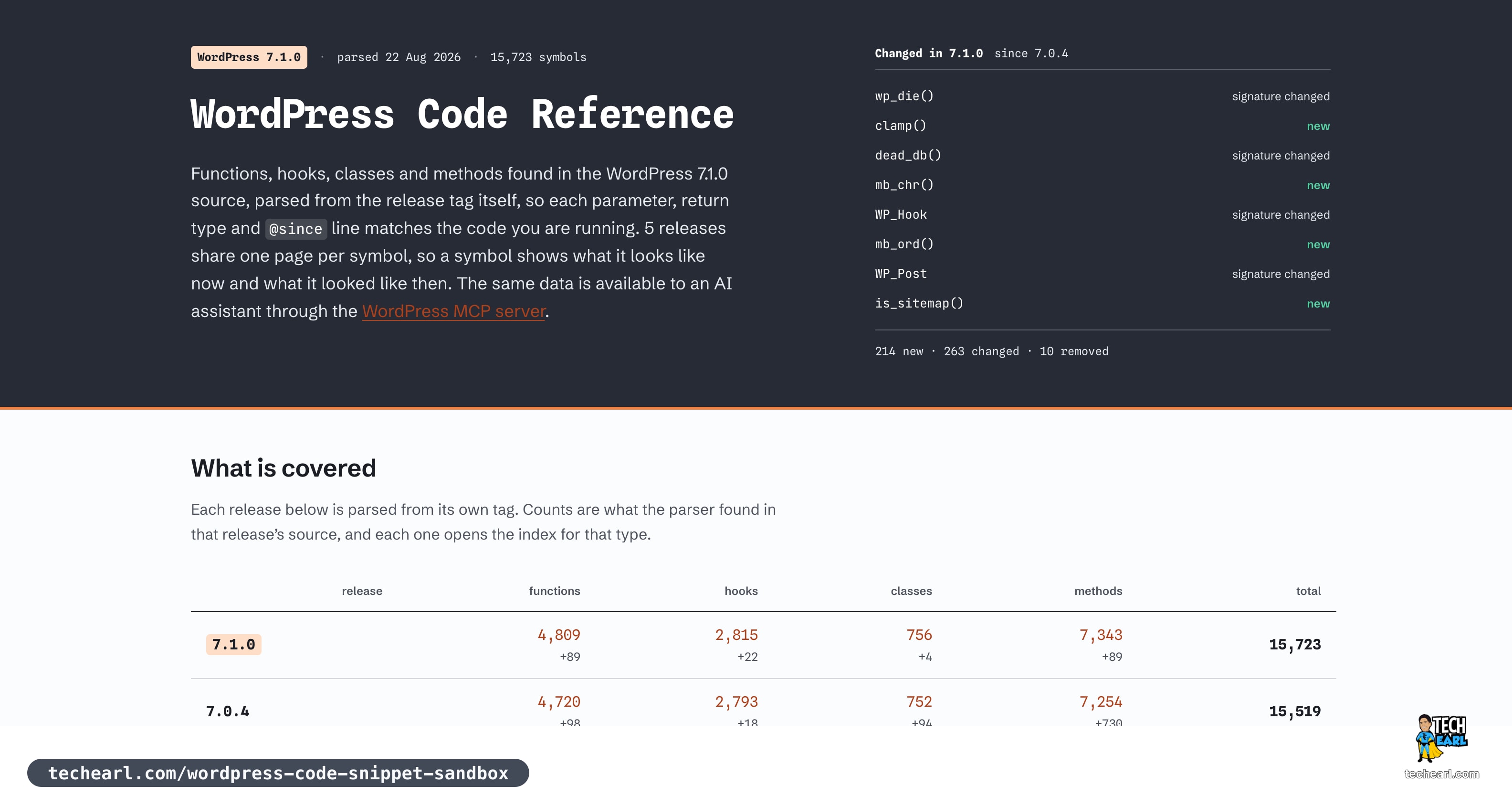
The hub splits the same way WordPress core does, and the same way the old WordPress codex and the current developer docs do, because that split matches how you actually search: WordPress functions (4,809), WordPress hooks (2,815), WordPress classes (756) and WordPress methods (7,343). A method gets its own page rather than being buried in its class, because a method is usually the thing you were looking for: WP_Query::get_posts() is its own URL, sitting under WP_Query. Hooks get the same treatment, so save_post has a page listing every place in core that fires it, and init is not just a mention inside somebody else's function. Function pages like wp_insert_post() and get_post_meta() carry the parsed signature, the parameters, runnable examples, the hooks fired, and every core call site. The methodology page sets out how all of that is produced, including what static parsing cannot see: dynamically assembled hook names, symbols declared inside a conditional, call sites reached only through a variable callback, and docblocks that are simply wrong in core.
Hooks in the order they fire
This is the part that pays for the whole exercise. Because the parser reads the function body rather than the docblock, a function page can list the hooks it fires in source order, with the line number and how far into the body each one sits.
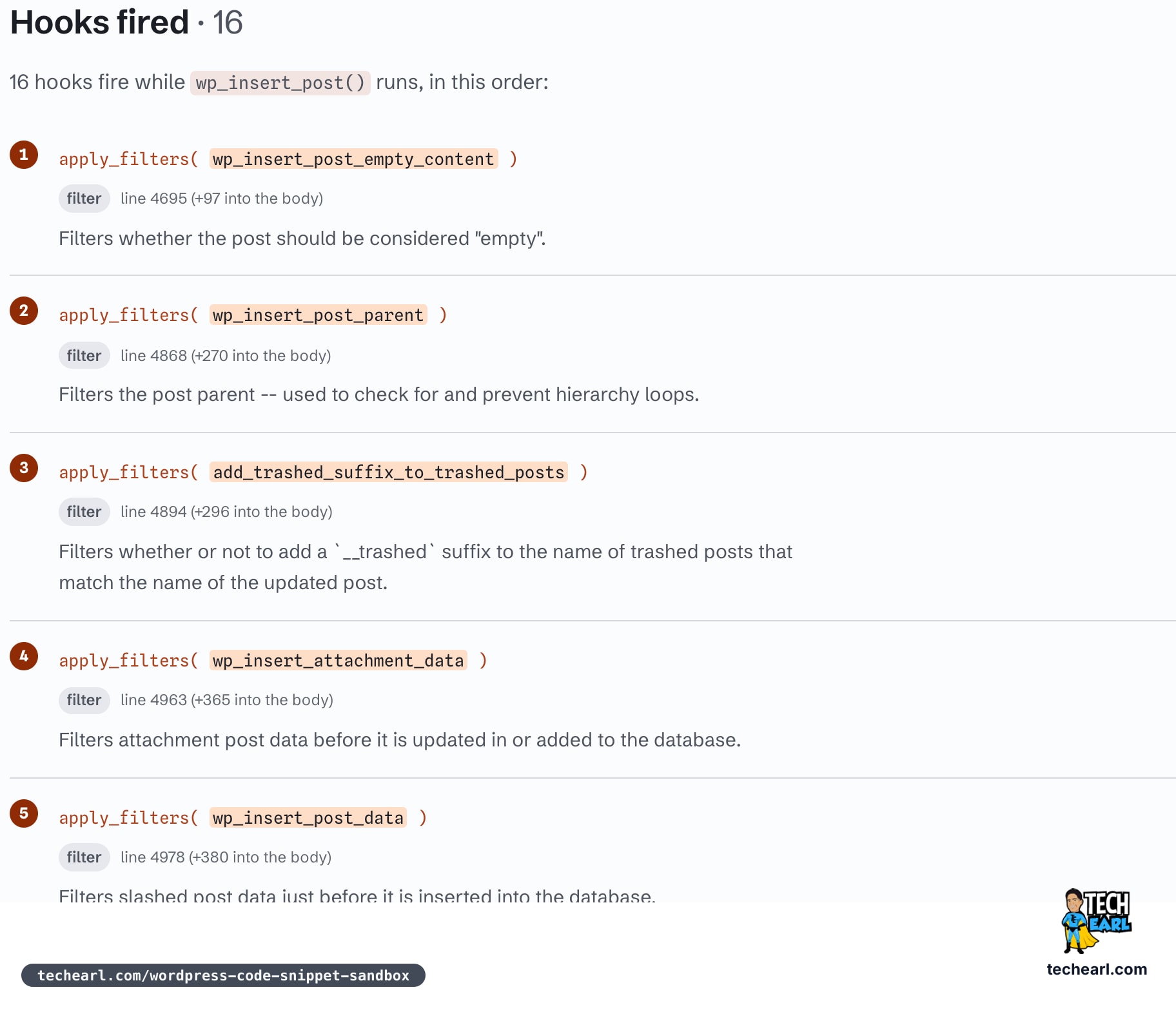
Sixteen hooks fire while wp_insert_post() runs. Knowing that wp_insert_post_data is number five and save_post is number fifteen is the difference between filtering the data before it hits the database and reacting after the write. Reconstructing that order by hand means opening wp-includes/post.php and scrolling through seven hundred lines, which is exactly the kind of thing you do not want to be doing while someone waits in a support channel.
One page per symbol, five releases
The reference tracks the five most recent release lines: 6.7.7, 6.8.8, 6.9.7, 7.0.4 and 7.1.0. A symbol keeps a single URL across all of them with a version switch on the page, rather than getting five competing per-release URLs. Because each release is parsed separately and the results are diffed, "added in", "signature changed" and "removed" are computed facts rather than a reading of the @since tag.
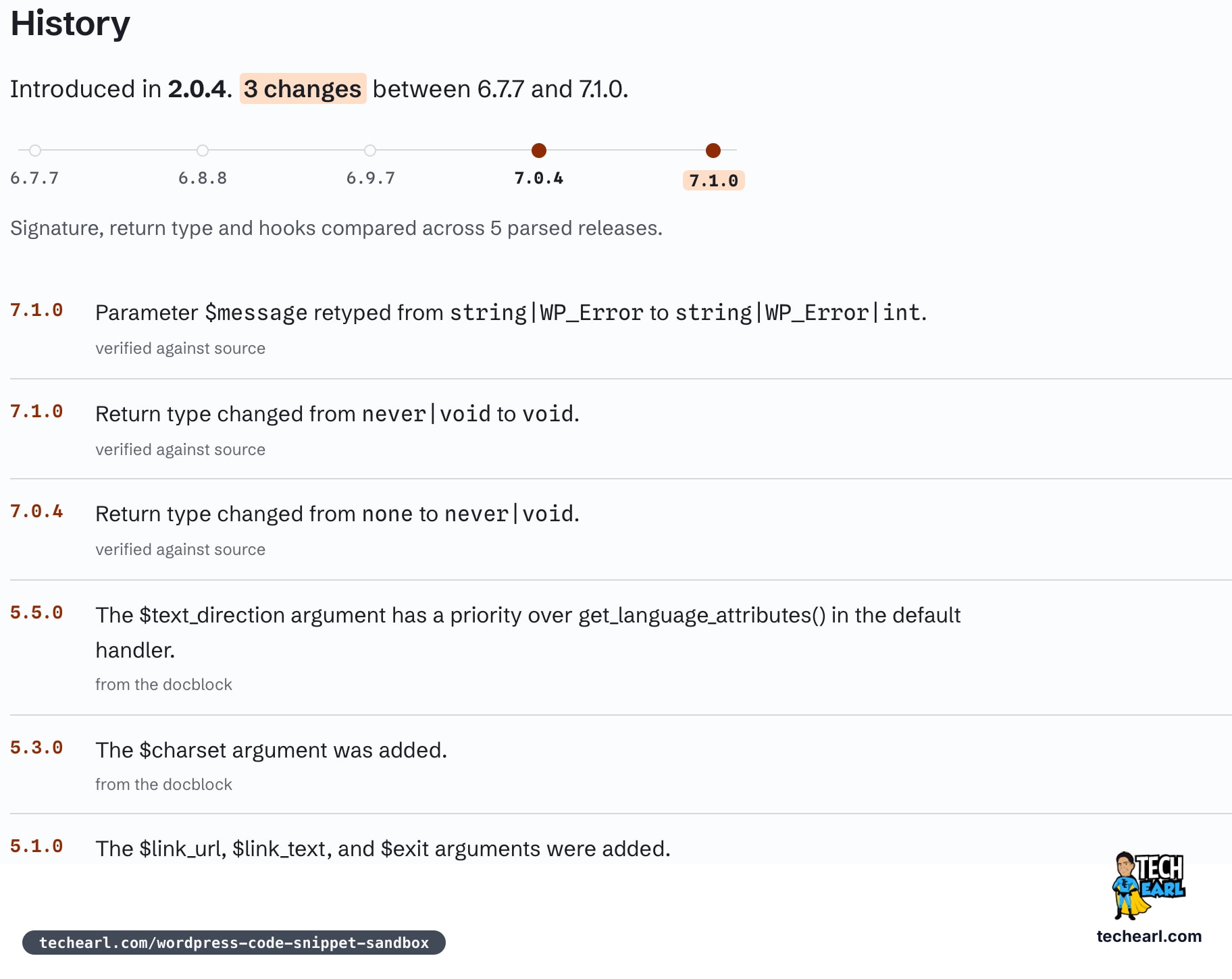
wp_die() is a good example: $message was retyped and the return type moved twice across those five releases. When someone reports that a snippet works on their staging site and not on yours, that timeline is usually where the answer is.
Finding the symbol when you half-remember the name
The header search covers all 15,723 symbols and takes / as a shortcut. Each index also has its own filter box and an A-Z jump bar with per-letter counts, which is the faster route when you know the shape of the name but not the spelling.
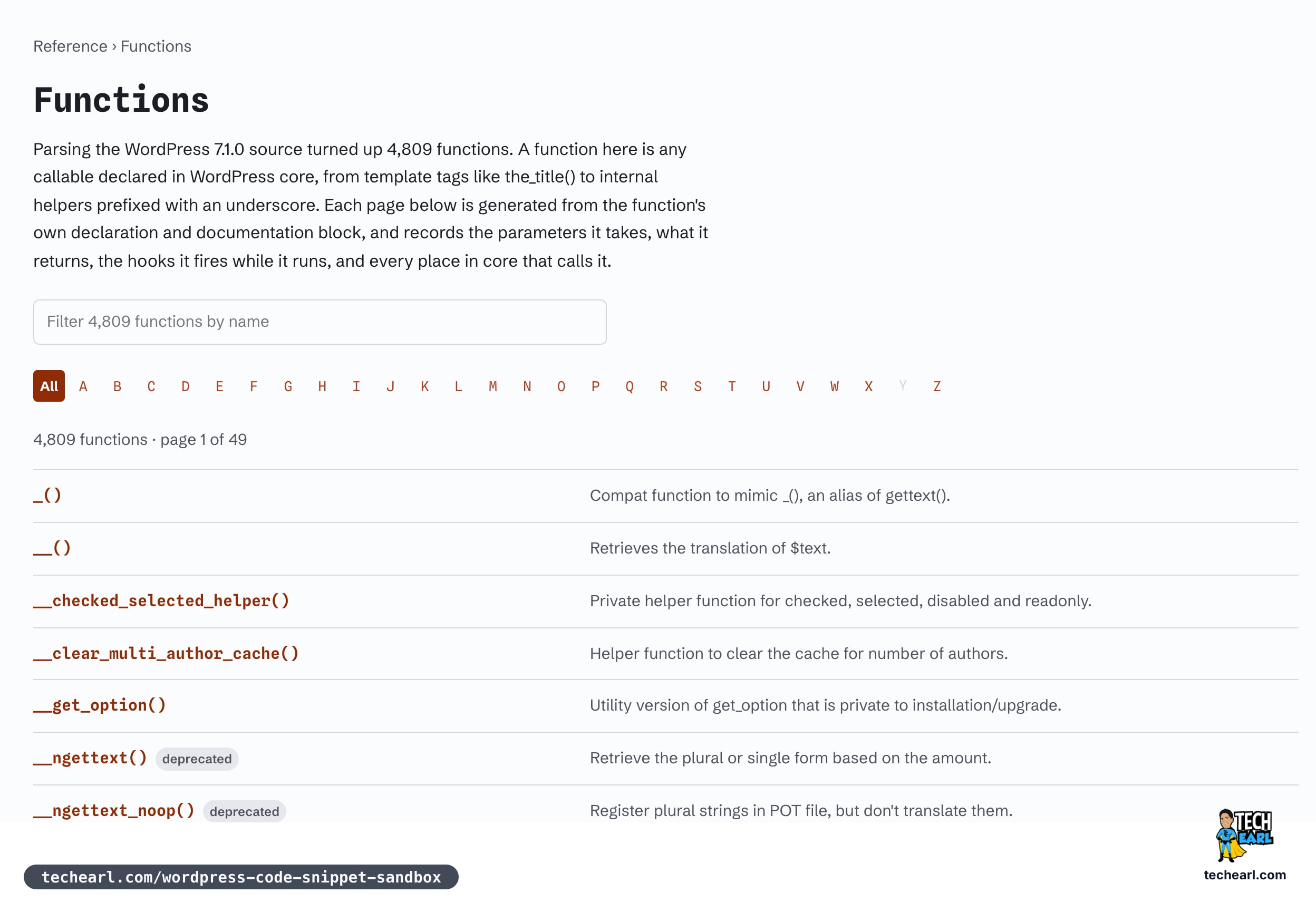
Deprecation is flagged in the list itself, so __ngettext() is marked before you click it rather than after.
Why a second reference exists at all
The obvious objection is that WordPress already has a code reference, and it does. The answer is that these two are doing different jobs.
A paste needs its links to still resolve in three years. Pastes get shared in channels, pasted into tickets, and linked from Stack Overflow answers, and a link that breaks when someone else reorganises their site takes the paste's usefulness with it. Generating the reference from source at a release tag means the target of every link in a paste is under the same roof as the paste.
The presentation is also doing something the official docs are not built to do. Hooks in execution order, a computed caller list, a diff-based release history, one URL per symbol across five releases: those come out of parsing the whole tree at once and comparing releases against each other. Filing a request against someone else's documentation site to reshape a page around one site's specific need is not a realistic path, so building the data independently and presenting it a second way is the practical one. Two references consuming the same source in different shapes is a better outcome than one reference that has to be everything.
It also answers to an AI assistant
The same parsed corpus is exposed over MCP, which matters if you are the sort of person who asks Claude or Cursor a WordPress question and gets a plausible signature that has been wrong since 5.6. The MCP server is read-only, needs no key, and connects with one command:
claude mcp add --transport http wppaste https://wppaste.com/api/mcpThe tools cover symbol search and lookup, reading parsed source, comparing releases, listing the sandbox environments, and creating a paste or a Playground link so the assistant hands you a runnable example instead of a code block. The scope is WordPress core only: a WooCommerce function will not resolve, even though the store environment can run one.
The workflow it is actually for
Put together, the loop looks like this:
- Paste the snippet at wppaste.com and give it a title.
- Pick the environment it needs, or edit the blueprint if it needs something specific.
- Press Run and confirm it reproduces the problem.
- Share the link in
#wordpresson Libera.Chat, a ticket, or a pull request comment. - Whoever helps opens it, presses Run, edits the code, and hands back a link that works.
The Live chat item in the site header goes straight to #wordpress on Libera. It is a volunteer channel, nobody there is paid to help you, and the etiquette that has always applied still applies: say what you expected and what happened, say which WordPress version, then wait. The paste link is what makes the first two of those cheap to answer.
The domain has been registered since February 2022, and the idea is older than that. There used to be a paste site that did something similar for WordPress, linking the symbols in a snippet out to documentation, and it went offline. The half of it worth keeping was never the syntax highlighting. It was that the reader could see what the code was reaching for without leaving the page. Adding a real WordPress to press Run in is the part that was not possible then.
Yes, with WordPress already loaded. The snippet runs as real PHP, so var_dump() and echo behave normally and a fatal error surfaces as one. The difference from a bare PHP sandbox is that core functions are available, so you can call get_option() or wp_insert_post() without setting anything up.
No. The corpus is WordPress core only. A sandbox environment can have WooCommerce or ACF active so your snippet can call their functions, but wc_get_product() has no reference page.
The site detects that and loads the snippet as a must-use plugin rather than running it top to bottom, so add_action() and add_filter() callbacks fire at the right point in the WordPress lifecycle instead of never firing at all.
Sources
Authoritative references this article was fact-checked against.
- How these pages are built: WPPastewppaste.com
- WordPress Playground documentationwordpress.github.io
- save_post: WordPress Developer Resourcesdeveloper.wordpress.org
- Must-Use Plugins: WordPress Developer documentationdeveloper.wordpress.org
- Libera.Chat IRC networklibera.chat


