


To bulk-process WordPress posts with AI cheaply, do not loop one synchronous API call per post. Assemble every post into one asynchronous batch API job, submit it, and collect the results later at half the token price. Read each post's content and fields, batch them correctly, then write the model's answers back, skipping rows already done.
Say you run a directory site: 20,000 listing posts, each one a person or a company, with the body content in the editor and a handful of fields (phone, website, bio, category) that are half empty or stale. You want AI to fill them in. The obvious approach is a loop: pull a batch of 100 posts, send each one to the model, write the answer back, repeat. That loop works, and it is also the most expensive way to do it. Every call is a separate, full-price, synchronous request, and you will hit your rate limit long before you finish.
The cheaper path is the provider's batch API: assemble all the posts into one async job, submit it, and collect the results later at half the token price. This is the WordPress-specific version of the LLM batch API guide. The model and the API are provider-agnostic (this works the same on Claude, OpenAI, or Gemini); what is WordPress-specific is reading the content, batching it correctly, and writing the results back without making a mess.
Pricing and API details here are current as of June 2026. Check the provider pricing pages in Sources before you run a real job, and always dry-run against a few posts first.
Jump to:
- True batch, not a faster loop
- What this article is not about
- The two-phase design
- Phase 1: read your content and submit one batch
- Phase 2: collect results and write them back
- Making it safe to re-run
- Where this runs: WP-CLI, or a plugin on cron
- The cost difference, and picking the model
- FAQ
True batch, not a faster loop
The distinction is the whole point, so it goes first. "Batching in WordPress" usually means a WP_Query loop that processes posts in pages of 100 to avoid loading 20,000 rows into memory at once. That is good database hygiene, but it is not a batch API call. If inside that loop you fire one synchronous AI request per post, you are paying full price 20,000 times.
A true batch is one request to the provider's batch endpoint carrying all 20,000 sub-requests, billed at 50%, returned within 24 hours. You still page through WP_Query to read the posts without exhausting memory, but the AI work goes out as a single job, not 20,000 separate calls. Paging the database and batching the API are two different things, and you want both: page the reads, batch the model.
What this article is not about
Your post content is messy. It is Gutenberg blocks, raw HTML, shortcodes, maybe some plain text. Deciding what to send the model (strip the HTML? keep the headings? include the ACF fields as context?) is your own pre-processing logic, and it depends on your data. A reasonable default is wp_strip_all_tags( $post->post_content ) to send clean text, or a block parser if structure matters. This guide does not go deep on that step, because it is specific to your content. The focus here is the part that is the same for everyone: the batch request flow and writing results back safely.
The two-phase design
Here is the wrinkle that shapes everything: the batch API is asynchronous. You submit a job and the results come back minutes to hours later. A single WP-CLI command cannot submit and collect in one run, because it would have to block for up to 24 hours. So the clean design is two commands:
- Submit. Page through the posts, build the batch payload, POST it to the provider, and store the returned batch id in an option. Exit.
- Apply. Later (a cron job, or you run it by hand), poll the batch. When it is done, fetch the results, match each one back to its post by
custom_id, and write the fields.
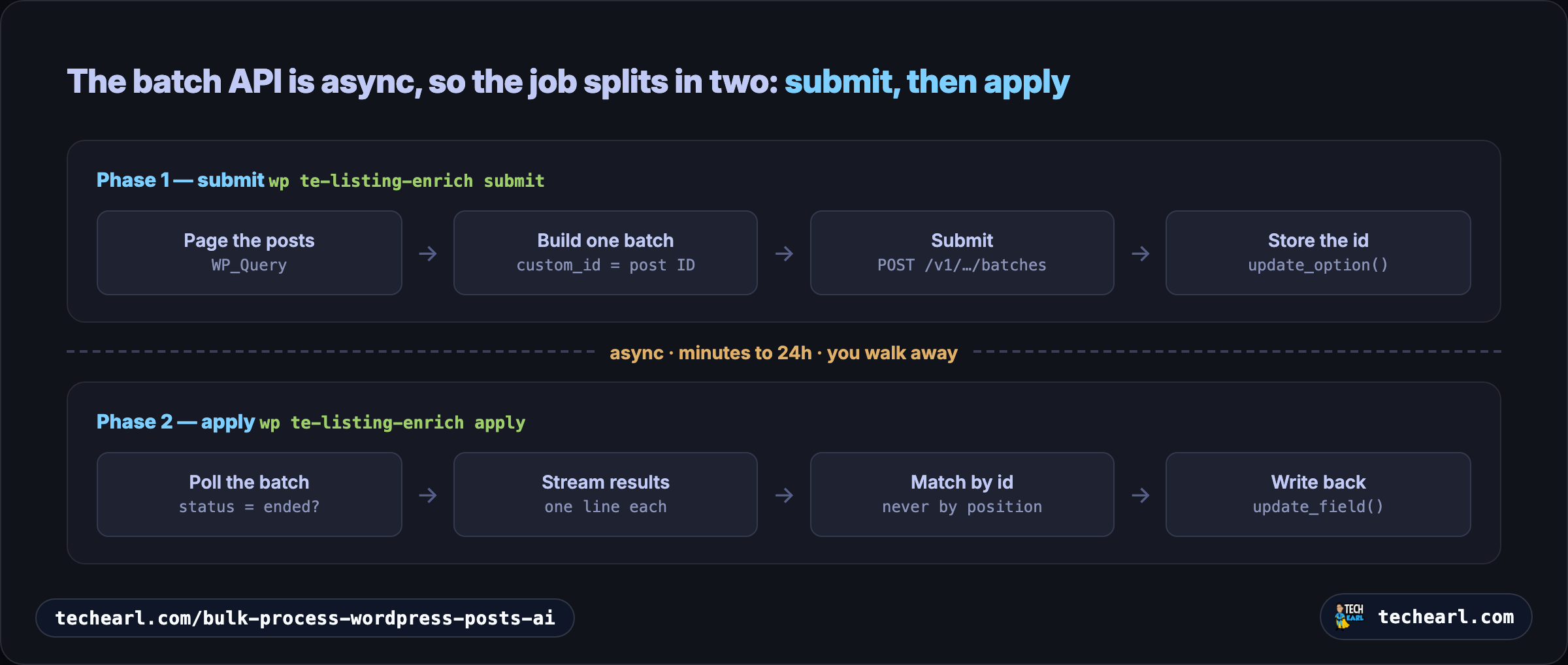
This two-phase shape is not a workaround, it is the correct model for async work, and it maps exactly onto "submit the batch, walk away, come back for it."
PHP has no official Anthropic SDK, so the example uses wp_remote_post against the REST endpoint directly. The functions the example defines are prefixed te_ to keep them out of the global namespace, which is ordinary WordPress practice.
Phase 1: read your content and submit one batch
This WP-CLI command pages through the listings, builds one JSONL-style request array keyed by post ID, submits it as a single batch, and saves the batch id.
<?php
/**
 * WP-CLI: te-listing-enrich submit
 * Reads listings, submits ONE batch to the LLM, stores the batch id.
 */

if ( ! defined( 'TE_LLM_API_KEY' ) ) {
    define( 'TE_LLM_API_KEY', getenv( 'ANTHROPIC_API_KEY' ) );
}

const TE_ENRICH_INSTRUCTIONS = 'You enrich business directory listings. '
    . 'Given the listing text, return ONLY JSON: '
    . '{"website": string|null, "phone": string|null, "summary": string}. '
    . 'Use null when a value is not present. Do not invent data.';

/**
 * Build one batch request for a single post.
 * custom_id is the post ID, which is how we match the result back later.
 */
function te_build_request( $post ) {
    $content = wp_strip_all_tags( $post->post_content ); // your pre-processing

    return array(
        'custom_id' => (string) $post->ID,
        'params'    => array(
            'model'      => 'claude-haiku-4-5', // cheapest tier that passes the task
            'max_tokens' => 512,
            'system'     => array(
                array(
                    'type'          => 'text',
                    'text'          => TE_ENRICH_INSTRUCTIONS,
                    'cache_control' => array( 'type' => 'ephemeral', 'ttl' => '1h' ),
                ),
            ),
            'messages'   => array(
                array( 'role' => 'user', 'content' => $content ),
            ),
        ),
    );
}

function te_submit_command( $args, $assoc_args ) {
    $batch_size = isset( $assoc_args['per-page'] ) ? (int) $assoc_args['per-page'] : 200;
    $dry_run    = isset( $assoc_args['dry-run'] );
    $requests   = array();
    $paged      = 1;

    // Page the DB reads so we never load 20,000 posts at once.
    do {
        $query = new WP_Query( array(
            'post_type'      => 'listing',
            'post_status'    => 'publish',
            'posts_per_page' => $batch_size,
            'paged'          => $paged,
            // Only posts not already enriched: idempotency, see below.
            'meta_query'     => array(
                array( 'key' => '_te_enriched', 'compare' => 'NOT EXISTS' ),
            ),
        ) );

        foreach ( $query->posts as $post ) {
            $requests[] = te_build_request( $post );
        }
        $paged++;
    } while ( $query->post_count > 0 );

    WP_CLI::log( sprintf( 'Built %d requests.', count( $requests ) ) );

    if ( empty( $requests ) ) {
        WP_CLI::success( 'Nothing to enrich.' );
        return;
    }
    if ( $dry_run ) {
        WP_CLI::success( 'Dry run: not submitting.' );
        return;
    }

    // ONE batch call carrying every request.
    $response = wp_remote_post( 'https://api.anthropic.com/v1/messages/batches', array(
        'timeout' => 60,
        'headers' => array(
            'x-api-key'         => TE_LLM_API_KEY,
            'anthropic-version' => '2023-06-01',
            'content-type'      => 'application/json',
        ),
        'body'    => wp_json_encode( array( 'requests' => $requests ) ),
    ) );

    if ( is_wp_error( $response ) ) {
        WP_CLI::error( $response->get_error_message() );
    }

    $body     = json_decode( wp_remote_retrieve_body( $response ), true );
    $batch_id = $body['id'] ?? null;

    if ( ! $batch_id ) {
        WP_CLI::error( 'No batch id returned: ' . wp_remote_retrieve_body( $response ) );
    }

    update_option( 'te_pending_batch', $batch_id, false );
    WP_CLI::success( "Submitted batch {$batch_id}. Run the apply command later." );
}

WP_CLI::add_command( 'te-listing-enrich submit', 'te_submit_command' );
Run it:
wp te-listing-enrich submit --per-page=200 --dry-run   # see the count first
wp te-listing-enrich submit                            # actually submit
Notice the model is claude-haiku-4-5, the cheapest tier, because pulling a website and phone out of existing text is a low-ambiguity job. Picking the right tier is the biggest cost lever before you even get to batching (see Haiku vs Sonnet vs Opus). The shared instructions carry a cache_control marker, but it only caches once the shared prefix clears the model's minimum (4,096 tokens on Haiku 4.5, 1,024 on Sonnet 4.6). This short instruction block is below that, so caching is a no-op here; it earns its keep when the shared context is large, like a long rubric or schema (see prompt caching).
Phase 2: collect results and write them back
The second command polls the stored batch. When it has ended, it streams the results, matches each one to its post by custom_id, and writes the fields. This is where keying by custom_id matters: results come back in no particular order.
<?php
/**
 * WP-CLI: te-listing-enrich apply
 * Polls the pending batch; when done, writes results back to each post.
 */

function te_apply_command( $args, $assoc_args ) {
    $batch_id = get_option( 'te_pending_batch' );
    if ( ! $batch_id ) {
        WP_CLI::error( 'No pending batch. Run the submit command first.' );
    }

    // 1. Check status.
    $status = te_api_get( "https://api.anthropic.com/v1/messages/batches/{$batch_id}" );
    if ( ( $status['processing_status'] ?? '' ) !== 'ended' ) {
        WP_CLI::warning( 'Batch not finished yet. Try again later.' );
        return;
    }

    // 2. Fetch the results (a .jsonl stream; one line per result).
    $results_url = $status['results_url'];
    $raw         = wp_remote_retrieve_body( wp_remote_get( $results_url, array(
        'timeout' => 120,
        'headers' => array(
            'x-api-key'         => TE_LLM_API_KEY,
            'anthropic-version' => '2023-06-01',
        ),
    ) ) );

    $written = 0;
    foreach ( explode( "\n", trim( $raw ) ) as $line ) {
        if ( '' === $line ) {
            continue;
        }
        $entry   = json_decode( $line, true );
        $post_id = (int) $entry['custom_id']; // match by id, NEVER by position

        if ( ( $entry['result']['type'] ?? '' ) !== 'succeeded' ) {
            WP_CLI::warning( "Post {$post_id} failed; leaving it for the next run." );
            continue;
        }

        $text = $entry['result']['message']['content'][0]['text'] ?? '';
        $data = json_decode( $text, true );
        if ( ! is_array( $data ) ) {
            WP_CLI::warning( "Post {$post_id}: unparseable response, skipping." );
            continue;
        }

        // Sanitize FIRST, then test the cleaned value, so a junk input
        // (a disallowed URL scheme, "n/a") never writes an empty field.
        // update_field() is ACF; use update_post_meta() without ACF.
        $website = esc_url_raw( $data['website'] ?? '', array( 'http', 'https' ) );
        $phone   = sanitize_text_field( $data['phone'] ?? '' );
        $summary = sanitize_text_field( $data['summary'] ?? '' );

        if ( $website ) {
            update_field( 'website', $website, $post_id );
        }
        if ( $phone ) {
            update_field( 'phone', $phone, $post_id );
        }
        if ( $summary ) {
            update_field( 'bio', $summary, $post_id );
        }

        update_post_meta( $post_id, '_te_enriched', current_time( 'mysql' ) );
        $written++;
    }

    delete_option( 'te_pending_batch' );
    WP_CLI::success( "Wrote {$written} listings." );
}

/** Small GET helper so the example does not repeat itself. */
function te_api_get( $url ) {
    $response = wp_remote_get( $url, array(
        'timeout' => 60,
        'headers' => array(
            'x-api-key'         => TE_LLM_API_KEY,
            'anthropic-version' => '2023-06-01',
        ),
    ) );
    return is_wp_error( $response ) ? array() : json_decode( wp_remote_retrieve_body( $response ), true );
}

WP_CLI::add_command( 'te-listing-enrich apply', 'te_apply_command' );
Run it once the batch has had time to finish (or wire it to a recurring WP-Cron task):
wp te-listing-enrich applyEvery write goes through the right sanitizer: esc_url_raw (restricted to http and https) for the URL, and sanitize_text_field for the phone and the summary. The model output is untrusted text, so treat it exactly like user input.
Making it safe to re-run
The two things that make a bulk job survivable:
- Idempotency. The submit command only selects posts without the
_te_enrichedmeta, and the apply command sets that meta on success. Re-running submit picks up only what is left, so a crashed or partial run resumes cleanly instead of re-processing and re-paying for posts you already finished. - Failures stay in the queue. When a single result errors or comes back unparseable, the apply command skips it without setting the meta flag, so the next submit run retries just those. You never lose a post and you never double-charge for one.
This is the same discipline any large WP-CLI job needs, the same as running bulk scripts with WP-CLI and writing a custom WP-CLI command: make it resumable, make it dry-runnable, and validate every write.
Where this runs: WP-CLI, or a plugin on cron
I wrote this as a WP-CLI command on purpose. You could put the same logic in functions.php or a small plugin and fire it from an admin action, but a job that pages 20,000 posts and talks to a remote API has no business running inside a web request: it ties up a PHP-FPM worker for the whole run and will trip a request timeout. WP-CLI runs in its own PHP process, off the web stack, with no timeout, which is the right home for bulk work.
The asynchronous second phase, though, is a natural fit for cron, and that is where a plugin version gets interesting. Instead of running apply by hand, keep a small queue of pending batch ids (a row in the options table, or a custom table) and schedule a WP-Cron event that:
- checks the queue, and if it is empty, returns immediately so the job ends,
- for each pending batch id, asks the provider (Anthropic, OpenAI, or Gemini) whether that batch has finished,
- for any that are done, fetches the results, writes them back, and drops that id from the queue.
Set the interval to whatever suits the work: every 30 minutes, hourly, or longer for jobs you are happy to collect the next day. Because the event exits the instant the queue is empty or nothing has finished yet, it is not a process that sits running and chews resources; it wakes up, does a cheap status check, and stops. Same submit-then-collect shape as the two commands, just driven by the scheduler instead of by you.
The cost difference, and picking the model
The model is the biggest lever, and the right one depends on how hard the per-post job actually is. Pulling a website and a phone number out of existing text is low-ambiguity work, so Haiku handles it. Rewriting a bio with judgment is a Sonnet job. Genuinely hard per-post reasoning (reconciling conflicting sources, nuanced categorization) is where Opus earns its price. Match the tier to the complexity of the data you are processing, then batch.
For 20,000 listings at roughly 800 input and 200 output tokens each, here is the same job on each tier, synchronous versus batched:
| Model | Synchronous | True batch (50% off) |
|---|---|---|
| Haiku 4.5 | ~$36 | ~$18 |
| Sonnet 4.6 | ~$108 | ~$54 |
| Opus 4.8 | ~$180 | ~$90 |
(Rates used: Haiku 4.5 $1 / $5, Sonnet 4.6 $3 / $15, Opus 4.8 $5 / $25 per million input / output tokens; the batch column halves both.)
The 5x spread between Haiku and Opus is the real lesson: right-sizing the model moves the bill more than batching does, and the two stack. Pick the tier first, then batch.
Where caching fits: this job's shared instruction prefix is tiny, a few dozen tokens, well under the cache minimum (4,096 tokens on Haiku 4.5, 1,024 on Sonnet 4.6), so caching does nothing here. It earns its keep when the shared part of every request is large: a long extraction rubric, a big category taxonomy, a style guide, or a chunk of reference context you send with every post. Once that shared prefix clears the minimum, a cache_control marker on it bills the repeat reads at about 10% of input. See prompt caching, and the full menu of levers in how to cut your AI API bill.
Swapping providers is a field-name change, not a redesign: OpenAI uses POST /v1/batches with an uploaded JSONL file, and Gemini uses batches.create. The two-phase shape (submit, store the id, apply later) is identical on all three.
The same shape is not limited to text. If you needed to generate images for thousands of products, a hero shot per listing or several per product for different sections of the page, you can run the identical batched, write-back flow against an image model like Gemini Nano Banana, at the same 50% saving. Images make one extra demand: the prompt. You have to prompt precisely and confirm you are happy with the output before you commit to generating 20,000, because an off-target text field is a quick re-run, while an off-target image across a whole catalog is a lot of wasted generation.
FAQ
Because the batch API is asynchronous. A single command would have to block for up to 24 hours waiting for results, which is not viable in WP-CLI. Splitting into a submit command (build and send the batch, store the id) and an apply command (poll, then write back) matches how async work actually behaves: you hand off the job and collect it later, ideally from a recurring cron task.
Yes. The example uses update_field() because the directory scenario stores data in ACF fields, but the flow is identical for plain post meta or the post body. Replace update_field() with update_post_meta() for custom fields, or with wp_update_post() if you are rewriting the content itself. The batch request and result-matching logic do not change.
That is your pre-processing step, and it depends on your data. A clean default is wp_strip_all_tags( $post->post_content ) to send the model plain text. If block structure matters, use a block parser to extract just the parts you want. Decide what to send before building the request; the batch flow itself does not care what the content looks like.
It resumes cleanly. The submit command only selects posts that do not yet have the _te_enriched meta, and the apply command sets that meta only on a successful write. A crashed run leaves the unfinished posts unmarked, so the next submit picks up exactly what is left. Failed or unparseable results are skipped without the flag, so they get retried rather than lost.
Sources
Authoritative references this article was fact-checked against.
- Anthropic Message Batches documentationplatform.claude.com
- Anthropic pricingplatform.claude.com
- WP-CLI command referencedeveloper.wordpress.org


