


Every major LLM provider runs a batch API that costs 50% of the synchronous price: Anthropic, OpenAI, and Google all halve input and output tokens for work you submit as one job and collect later. Use it whenever you process thousands of items and no human waits on any answer. Size limits, format, and features differ per provider.
If you are processing thousands of things through an LLM in a loop, and no human is sitting there waiting for any single answer, you are almost certainly paying double. Every major provider runs a batch API that costs 50% of the synchronous price: Anthropic, OpenAI, and Google all halve both input and output tokens for work you submit as one job and collect later. The catch is that the discount is the only thing they agree on. The size limits, the file format, what tools run inside a batch, and how image generation is handled all differ, and a couple of those differences will quietly cost you money if you do not know them.
Prices, batch limits, and model names here are current as of June 2026. These APIs move fast. I link every provider's pricing page in the Sources at the bottom, so check them before you budget a real job.
Jump to:
- A true batch is not a loop
- The 50% discount, compared across providers
- Ten jobs worth batching
- The cost math on a real job
- Two gotchas that cost you money
- Which model for which job
- A runnable Node example
- Caveats before you ship
- FAQ
A true batch is not a loop
This is the part most people get wrong, so it goes first. A true batch is one request to the provider's batch endpoint carrying many sub-requests, processed asynchronously, billed at half price. It is not a for loop that grabs 100 records and fires 100 ordinary synchronous calls. That second thing is just chunking on your side. It runs at full price, it burns your per-minute rate limit, and it is the exact pattern that produces the surprise bill.
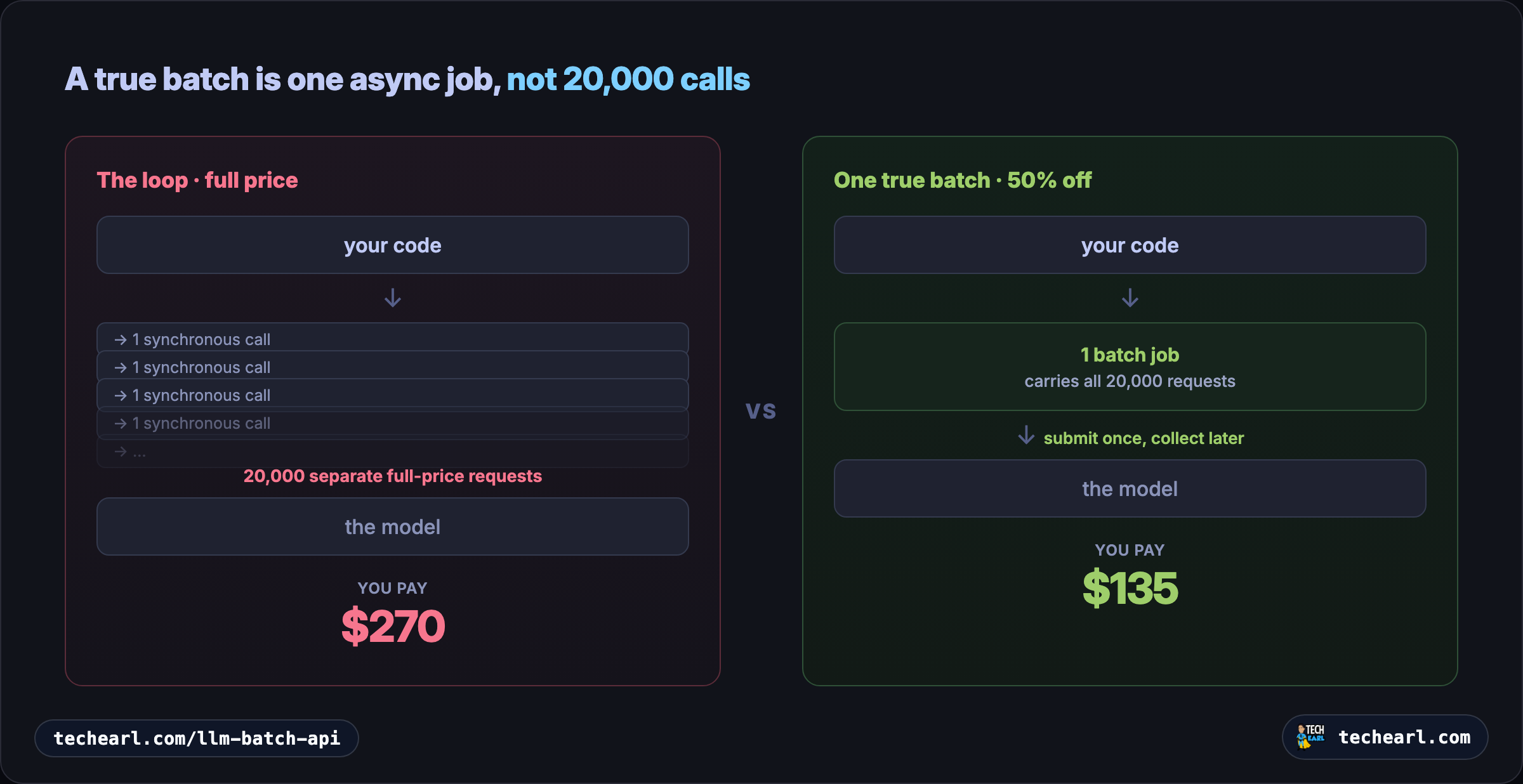
The mental model:
- Fake batch (full price): your code loops, calling
messages.create()(orchat.completions.create()) once per item. You feel like you are "batching" because you process them in groups of 100, but each call is a separate, synchronous, full-price request. - True batch (half price): you assemble all the items into one payload, hand it to the batch endpoint, walk away, and come back for the results. The provider schedules the work on its own time, which is why it can afford to discount it.
The trade you are making is latency for cost. Synchronous calls come back in seconds. A batch comes back within 24 hours, usually much sooner, and you give up the ability to react to any single result mid-flight. For anything where the output lands in a database, a spreadsheet, a queue, or a nightly report rather than in front of a waiting user, that trade is free money.
The 50% discount, compared across providers
All three discount input and output tokens by 50%. Everything else is where they differ.
| Claude (Anthropic) | OpenAI | Gemini (Google) | |
|---|---|---|---|
| Discount | 50% in and out | 50% | 50% |
| Turnaround | Under 1h typical, 24h max | 24h window | 24h target, often faster |
| Max per batch | 100,000 requests / 256 MB | 50,000 requests / 200 MB | 2 GB input file |
| Throughput cap | not published | 2,000 batches/hour | not published |
| Input format | JSON requests array, one custom_id each | JSONL file, upload first | inline (under 20 MB) or JSONL via Files API |
| Create call | messages.batches.create | POST /v1/batches | batches.create |
| Caching stacks with batch | yes (prompt caching) | yes (automatic caching) | yes (context caching) |
| Server tools in a batch | yes (web search, fetch, code execution) | limited | limited |
| Image generation in a batch | no image generation | yes | yes (Nano Banana) |
| Results order | unordered, key by custom_id | unordered, key by custom_id | inline by index, file by key |
Two rows are worth dwelling on. The caching row: the batch discount and prompt caching stack, so the savings multiply on any job that shares a big prefix (see the worked math below). And the image row: Claude has no image generation (its batch still handles vision inputs, just does not produce images), while OpenAI and Gemini can batch image generation. If your high-volume job is "make 5,000 images," that work goes to Gemini or OpenAI, which is a separate write-up: cutting your Gemini Nano Banana bill in half with the Batch API.
The one rule worth burning in, and the single most common bug: do not assume results come back in input order. On Claude and OpenAI you match each result to its request by custom_id, never by position; a worker that assumes line 5 of the output matches line 5 of the input will silently scramble your data the first time results come back reordered. Gemini's inline path is the exception, returning responses in request order so you can map by index, while its file path uses a key you assign.
Ten jobs worth batching
The tell is always the same: nobody is waiting for any one answer. Here are the workloads where this shows up, lightest to heaviest.
Everyday (agencies, site owners, solo developers)
- Bulk content enrichment in a CMS. Rewriting, summarizing, or extracting structured fields across thousands of posts or products. The WordPress version of this is its own guide: processing hundreds of WordPress posts with AI at half the cost.
- Product-catalog work. Generating descriptions, pulling attributes (material, fit, dimensions) into structured fields for an e-commerce catalog.
- SEO meta generation. Drafting titles and meta descriptions for a whole site at once.
- Support-ticket and review classification. Tagging a backlog by sentiment, topic, and urgency to route or report on it.
- Document extraction. Pulling parties, dates, amounts, and clauses out of tens of thousands of PDFs into a database.
- Content-library translation. Localizing a help center or catalog into several languages with a shared glossary.
Heavier (platform and ML teams)
- LLM-as-judge evaluation runs. Scoring thousands of model outputs against a rubric for an eval harness or an A/B test.
- Synthetic data generation. Producing labeled examples, test cases, or Q&A pairs to train or evaluate another model.
- Codebase-wide analysis. Generating docstrings, file summaries, or migration notes across an entire repository, one request per file.
- Research over a scraped corpus. Summarizing or extracting entities from thousands of pages, papers, or transcripts.
If a job in your stack matches the shape (high volume, latency-tolerant, output goes somewhere other than a live user), it belongs in a batch.
The cost math on a real job
Take a concrete job: enrich 20,000 records, roughly 2,000 input tokens and 500 output tokens each, on Claude Sonnet 4.6. Sonnet's standard rate is $3 per million input tokens and $15 per million output; the batch rate is half that, $1.50 and $7.50.
| Approach | Input | Output | Total |
|---|---|---|---|
| Naive synchronous loop | 20,000 × 2,000 × $3/M = $120 | 20,000 × 500 × $15/M = $150 | $270 |
| True batch (50% off) | $60 | $75 | $135 |
Batching alone halves it, exactly as advertised. Now stack caching. If 1,200 of those 2,000 input tokens are a shared prefix (the same instructions and schema on every record), a cache read costs 10% of base input, and that read also gets the batch discount on top, because the two stack. The input side drops toward $15 to $25 depending on your hit rate, and cache hits inside a batch are best-effort (typically 30% to 98%), so use the 1-hour cache TTL since batches can run past the 5-minute window. The caching mechanics are a full guide of their own: cutting LLM API costs with prompt caching.
The headline is not "batching is cheaper." It is that the model you pick and the work you avoid usually move the bill more than batching does. The same 20,000 records on Haiku 4.5 (batch rate $0.50 in, $2.50 out) land near $40 before caching. Anthropic's own docs put 10,000 support tickets on Haiku at about $37. Reach for the right tier first (Haiku, Sonnet, or Opus), then batch, then cache. All three levers, plus the others, live in the cost-cutting overview.
Two gotchas that cost you money
These are the things the comparison table hints at and the docs bury.
Web search is not batched. Server tools, including web search, do run inside a batch (Claude runs the same server-side agentic loop in batch mode that it does synchronously). But the batch discount applies only to input and output tokens. Web search is billed as a usage fee, $10 per 1,000 searches, and that fee is not discounted. So on an enrichment job that does one web search per record, batching halves the token cost but the search fee sits on top, unbatched. For 20,000 records that is $200 in search fees regardless of how you submit the work.
Web fetch is free, so prefer it when you can. If your job already has a candidate URL (you know the company's domain, you just need the page content), web_fetch costs nothing beyond the tokens for the content it pulls in. It is web_search, the discovery step, that costs $10 per 1,000. Restructuring a job to fetch a known URL instead of searching for an unknown one can erase the one line item that batching could not touch.
Which model for which job
Batching does not change which model you should use, and the model choice is often the bigger lever. Anthropic's own guidance lines up with what the work demands:
| Model | Batch input | Batch output | Best for |
|---|---|---|---|
| Haiku 4.5 | $0.50 | $2.50 | Simple, high-volume, low-ambiguity work: classification, tagging, format normalization, pulling a phone number out of existing text. The default for "20,000 of something easy." |
| Sonnet 4.6 | $1.50 | $7.50 | The workhorse: enrichment that needs judgment, rewriting, structured extraction from messy input. Most directory and catalog jobs. |
| Opus 4.8 | $2.50 | $12.50 | Genuinely hard per-item reasoning, nuanced moderation, complex multi-field synthesis, or judge-style evaluation where the verdict quality matters. Overkill for most bulk enrichment. |
(Prices per million tokens, batch rate, which is half the synchronous rate.)
A useful habit: run a sample of 50 records through Haiku and Sonnet, eyeball the difference, and only move up a tier if the cheaper one actually fails the task.
A runnable Node example
Here is the full Claude batch lifecycle in Node with the official SDK: build the requests, submit one batch, poll until it ends, then stream the results and key them by custom_id. The same three-step shape (create, poll, retrieve by id) applies to OpenAI's POST /v1/batches and Gemini's batches.create, with different field names.
import Anthropic from "@anthropic-ai/sdk";

const client = new Anthropic();

// Your records to enrich. In real life these come from a DB query.
const records = await loadRecords(); // [{ id, content }, ...]

// te-prefixed helpers keep the example's own functions namespaced.
function teBuildRequest(record) {
  return {
    custom_id: String(record.id), // the key you match results on later
    params: {
      model: "claude-sonnet-4-6",
      max_tokens: 1024,
      system: [
        {
          type: "text",
          text: ENRICH_INSTRUCTIONS, // stable prefix, same every record
          cache_control: { type: "ephemeral", ttl: "1h" },
        },
      ],
      messages: [{ role: "user", content: record.content }],
    },
  };
}

// 1. Submit ONE batch carrying every record (not a loop of calls).
const batch = await client.messages.batches.create({
  requests: records.map(teBuildRequest),
});
console.log(`Submitted ${records.length} requests as batch ${batch.id}`);

// 2. Poll until processing ends (minutes to hours; no open connection needed).
async function tePollUntilDone(batchId) {
  while (true) {
    const b = await client.messages.batches.retrieve(batchId);
    if (b.processing_status === "ended") return b;
    console.log(`  ${b.request_counts.processing} still processing...`);
    await new Promise((r) => setTimeout(r, 60_000));
  }
}
await tePollUntilDone(batch.id);

// 3. Stream results and key them by custom_id. Order is NOT guaranteed.
for await (const entry of await client.messages.batches.results(batch.id)) {
  const recordId = entry.custom_id; // never trust position
  if (entry.result.type === "succeeded") {
    const text = entry.result.message.content[0].text;
    await saveEnrichment(recordId, text);
  } else if (entry.result.type === "errored") {
    console.error(`  ${recordId} failed:`, entry.result.error);
  }
}
Three things to notice. The custom_id is the only safe link between a result and the record it belongs to. The shared instructions carry a cache_control marker with the 1-hour TTL, so a large enough stable prefix is cached across the batch (it has to clear the model's cache minimum to qualify). And there is no inner loop of API calls: one create, one retrieve loop, one results stream.
The same three-step shape works on the other two providers. OpenAI uploads a JSONL file first, then creates the batch against it:
import OpenAI from "openai";
import fs from "fs";
const client = new OpenAI();

// requests.jsonl: one { custom_id, method, url, body } object per line.
const file = await client.files.create({
  file: fs.createReadStream("requests.jsonl"),
  purpose: "batch",
});
const batch = await client.batches.create({
  input_file_id: file.id,
  endpoint: "/v1/chat/completions",
  completion_window: "24h",
});
// Poll client.batches.retrieve(batch.id) until status === "completed",
// then read client.files.content(batch.output_file_id) and key by custom_id.
Gemini takes inline requests directly (or a JSONL file for larger runs):
import { GoogleGenAI } from "@google/genai";
const ai = new GoogleGenAI({});

let job = await ai.batches.create({
  model: "gemini-2.5-flash",
  src: records.map((r) => ({ contents: [{ parts: [{ text: r.content }] }] })),
});
// Poll ai.batches.get({ name: job.name }) until job.state is terminal,
// then read job.dest.inlinedResponses (in request order).
Caveats before you ship
- Results are unordered. Key by
custom_id. This is the bug that scrambles data silently. - Cache hits in a batch are best-effort. Because the provider runs requests concurrently and in any order, you will see hit rates anywhere from 30% to 98%. Use the 1-hour TTL and put identical
cache_controlblocks on every request to maximize them. - Server-tool batches can return
pause_turn. A batch worker runs more agentic-loop iterations per turn than a synchronous request, but a long tool-using turn can still come back paused. If a result hasstop_reason: "pause_turn", the turn did not finish; resubmit the paused assistant content to continue it. - Half price is the floor, not the ceiling of savings. Stacking caching and right-sizing the model usually beats the batch discount on its own.
- Image jobs go elsewhere. Claude has no image generation. Batch image generation runs on Gemini Nano Banana or OpenAI.
What to do next
Batching is one lever. The full set, with the order to apply them, is in the guide to cutting your AI API bill. The two that stack hardest with batching:
- Prompt caching multiplies the savings on any job with a shared prefix.
- Choosing between Claude Haiku, Sonnet, and Opus is often the bigger win than batching itself.
And the two applied walk-throughs:
- Process hundreds of WordPress posts with AI at half the cost, with a PHP and WP-CLI example.
- Cut your Gemini Nano Banana bill in half with the Batch API, for bulk image generation.
FAQ
All three providers quote a 24-hour completion window, and all three usually finish well inside it. Anthropic says most batches end in under an hour, and Gemini expires any job not finished within 48 hours. The number to plan around is the 24-hour ceiling, not the typical time, because the whole point of batching is that you are not waiting.
Yes. Anthropic, OpenAI, and Google all bill batch input and output tokens at 50% of their synchronous rate. The discount is the one thing they fully agree on. What differs is the batch size limits, the file format, which server tools run inside a batch, and whether image generation is supported.
No. The batch discount applies to input and output tokens only. Server-tool usage fees, like the $10 per 1,000 web searches on Claude, are billed on top at full rate even inside a batch. Web fetch, by contrast, has no per-call fee, so prefer fetching a known URL over searching for an unknown one when you can.
Yes, and the discounts stack. A cached-token read costs 10% of base input, and that read still gets the batch discount on top. Because batch requests run concurrently, cache hits are best-effort (commonly 30% to 98%). Use the 1-hour cache TTL, since a batch can run longer than the default 5-minute window, and put identical cache markers on every request.
They are not in the wrong order, they are in no order. Every provider returns batch results in whatever sequence the work finished, which has nothing to do with input order. Always attach a unique custom_id to each request and match results back by that id. Reading results by position is the single most common batch bug.
Sources
Authoritative references this article was fact-checked against.
- Anthropic Message Batches documentationplatform.claude.com
- Anthropic pricingplatform.claude.com
- OpenAI Batch API guidedevelopers.openai.com
- Google Gemini Batch API documentationai.google.dev


